
Your voice service,
ready in one click.
Telvia is the enterprise softphone included with every Telvia voice subscription. Auto-provisioned, license-driven, and built for teams that need their phone to just work — no SIP fields, no settings, no surprises.
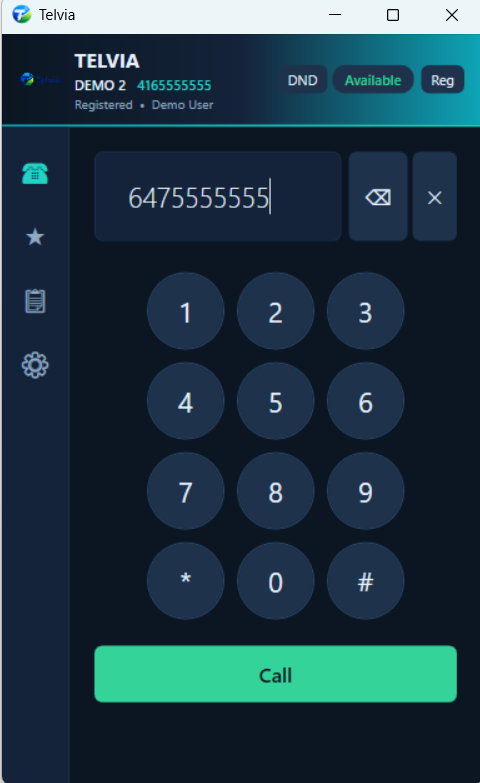
Every call feature your team expects.
Nothing left out.
Telvia ships with the complete HelixPhone enterprise calling stack — built on SIPSorcery, production-tested, and battle-hardened across thousands of daily calls.
Calling & dialer
HD SIP calling
Inbound and outbound SIP calls over UDP or TCP. Full G.711 audio with jitter buffering and NAudio playback.
On-screen dial pad & DTMF
Full keypad with DTMF tone generation (0-9, *, #) for IVRs, voicemail and conference bridges.
Caller ID & timer
Name and number display on every call, with a live duration timer and disposition tracking.
Call history
Local SQLite history of every call — direction, duration, disposition — with one-click redial.
Call management
Hold & resume
Proper SIP re-INVITE hold signalling, with remote-hold detection so you know when the other party parks you.
Mute / unmute
One-tap mic mute with clear visual state on the active-call button.
Blind transfer
Instant REFER-based transfer to any number or extension — hand off and hang up.
Attended transfer
Call the target first, announce, then complete the transfer — or cancel and return to the original caller.
3-way conference
Merge two active calls into a real-time mixed conference with a CONFERENCE badge and one-click end.
Call waiting
Answer or reject a second incoming call while on a call, with a non-blocking toast at the top of the window.
Call swap
Switch instantly between the active call and any held call with a dedicated swap button.
Speed dial
Personal speed-dial list with named entries, one-click dialing and persistent storage across sessions.
Presence, recording & integrations
Presence status
Six states — Available, Busy, Away, Lunch, DND, Offline — with colour-coded tray icon and webhook broadcast on change.
Do Not Disturb
Header-bar DND toggle that auto-rejects incoming calls and call waiting, persists across restarts and fires a webhook event.
Call recording & upload
Automatic stereo recording of local and remote audio to WAV, then upload to your endpoint with Bearer auth and 3-attempt retry.
CRM screen-pop
Automatic CRM lookup on incoming calls — opens your configurable URL with a {phone} placeholder substituted live.
Webhook events
Real-time POST notifications for ringing, answered, ended, DND, presence and registration — Bearer auth, retry & heartbeat.
System tray & toasts
Minimize-to-tray, close-to-tray, status-coloured tray icon, incoming-call popups and right-click status menu.
Audio device picker
Per-device input/output selection with live volume control — switch headsets without quitting a call.
Polished dark UI
Catppuccin-inspired dark theme, sidebar navigation (Dial Pad, Speed Dial, History, Settings) and pinned hang-up button.
Telvia-exclusive · Enterprise provisioning
These are what make Telvia different from a raw softphone. Zero-touch deployment at any scale.
License-key activation
Users activate with a license key and a password. No SIP host, port, username or realm to hand out ever again.
Auto-provisioning
First launch pulls SIP, webhook, recording and CRM config from settings.telvia.ca and writes the client automatically.
Hidden SIP credentials
The user's password only unlocks provisioning. Real SIP passwords are stored encrypted server-side and never shown in-app.
Remote block & revoke
Flip a license to blocked and calling is disabled within seconds. Flip to revoked and the client wipes itself.
Central config roll-out
Change settings server-side, bump config_version, and every client pulls the update on next login — no redeploy.
Machine binding
Per-device machine_id fingerprinting lets admins see where a license was activated and catch unexpected moves.
Live heartbeats
Periodic /api/check heartbeats report presence and pick up license state changes within check_interval_seconds.
Free with voice service
Every Telvia voice customer gets unlimited Telvia licenses at no extra cost. Onboard a new hire in under a minute.
Telvia for Windows v1.1.0
Download, install, enter your license key and password. Telvia handles the rest.
- File: Telvia-1.1.0.zip
- Size: 59.5 MB
- Published: 2026-04-16, 4:07:16 p.m.
- Platform: Windows 10 / 11 (x64)
No license yet? Contact your IT administrator — Telvia is free for every Telvia voice customer and licenses are issued from your company's admin portal.
From license key to ringing phone in under a minute.
-
1
Download Telvia
Grab the latest installer from this page and run it. Standard Windows installer, no admin tricks.
-
2
Activate
Enter the license key and password your administrator gave you. This password is only used to unlock provisioning — it is not your SIP password.
-
3
Auto-configure
Telvia contacts the provisioning service, pulls down SIP, webhook, recording and CRM settings, and registers.
-
4
Make calls
The main window opens already signed in. You're registered and ready to go.